FAQ:
Q1: This router is very cheap, can it bring smooth Internet speed?
A1: For your better experience, it is recommended that you choose a more expensive router, which can bring you better Internet speed.You can click the following image to jump to the corresponding link.
Q2: Does the router support all SIM carriers?
A2: Not all SIM Card operators are supported, for example Spain Digi SIM Card is not available.
Buy a SIM card can check before frequencies, website: https://www.frequencycheck.com/carriers/smart-philippines
Q3: My router's Internet speed is slow, how can I improve it?
A3: Buyers can log in to the WEB UI page and adjust the network mode of the router, which is recommended to be set to "4G Only". If indoors, buyers are advised to place the router in a position suitable for receiving signals.
Q4:Why can't I use the internet when I insert a SIM card?
A4:Even if your SIM card is compatible with the product, it is not all usim card necessarily plug and play, you need to disable the SIM card PIN and modify the APN.
Q5: Wrong or forgotten WIFI password?
A5: Users need to keep the router on, then press the reset button for 10-15 seconds and wait for the router to reboot, the router will restore the initial Wifi password.
Q6: Why doesn't the indicator light come on when the unit is powered on and won't start?
A6: We recommend that users check the voltage in their homes to see if it is normal. Try to change another power outlet or DC 12V power supply and try again.
Warm Tip:
We are factory,welcome to ask price for wholesale and dropshipping order
1.This router does not support Spanish Digi Mobil SIM Card.
2.After a SIM card is inserted in some countries, you need to configure APN info. to access the Internet
3. Asserted peak speed of 100 or 150Mps is tested in laboratory, you will never get these speeds in the daily using. It is because signal of ISP.
4. In order to get a better experience when you use router. We suggest to buy the version 3(EU version) if you are from Europe, Asia, Africa or Brazil.
5. Please do not compare speed of our router with cellphone's. Our products are much cheaper than cellphone, it is designed with a slower speed than cellphone.
6.Our 4G router only support universal ordinary SIM cards,donot suppport IOT card and Roaming card .when you buy sim card ,please ask if it can work in Router
7.Router's 4G chipset top capacity is 150M, and 4G base station's theoretical top speed is 150M too.However the 4G base station provide service to many 4G users at the same time,instead of giving full 150M bandwidth to one user,and 4G signal strength, SIM card limitation and environment would affect the network speed too
EU Version
4G LTE FDD:B1/B3/B7/B8/B20(2100/1800/2600/900/800MHZ)
4G LTE FDD:B38/B39/B40/B41(2600/1900/2300/2500MHZ)
3G WCDMA:B1/B8(2100/900MHZ)
2G GSM:B3/B8(1800/900MHZ)
Applicable to Europe, Africa, Asia, all countries and regions, such as Russia, Israel, South Korea, Spain, Brazil, Ukraine, France, Italy, Netherlands, India, Nigeria, Switzerland, Kazakhstan, Poland, Ghana, etc.
Description:
KuWFi C940 is a desktop WiFi 6 router with stable WiFi signal coverage. The 100M Ethernet port is suitable for most Home use scenarios, equipped with a SIM card slot, AC/DC power supply, supports 2.4Ghz, IPV6/IPV4 and 10 devices connected at the same time, making indoor WiFi coverage easier.
CAT4 4G LTE Router
The Router provide a Nano SIM Card Slot. After inserting the SIM card and logging in to the WEB UI to configure the APN information, the SIM card signal can be converted to Wi-fi signal.4G LTE transmission rate up to 150Mbps(DL) / 50Mbps(UL).
300Mbps 2.4GHz Wirelee Wi-Fi
This router provides only 2.4Ghz Wi-Fi signals. 2.4GHz Wi-Fi rates up to 300Mbps.
Support Three Working Modes
(1)AP Mode:
Connect the upper-layer network to the WAN port of the router through a network cable to provide the Internet for the router. Users can choose to connect to the router's Wi-Fi signal or LAN port to provide network for other devices.
(2)4G to Wi-Fi Signal Mode:
After inserting a SIM card, log in to the WEB UI to configure correct APN information for the SIM card. It will convert the SIM network signal into a Wi-Fi signal.
(3)4G to Wired Mode:
When the router successfully connected to the SIM card's 4G network, the user can provide the network to other network devices through the LAN port.
4Pcs Non-detachable External Antennas
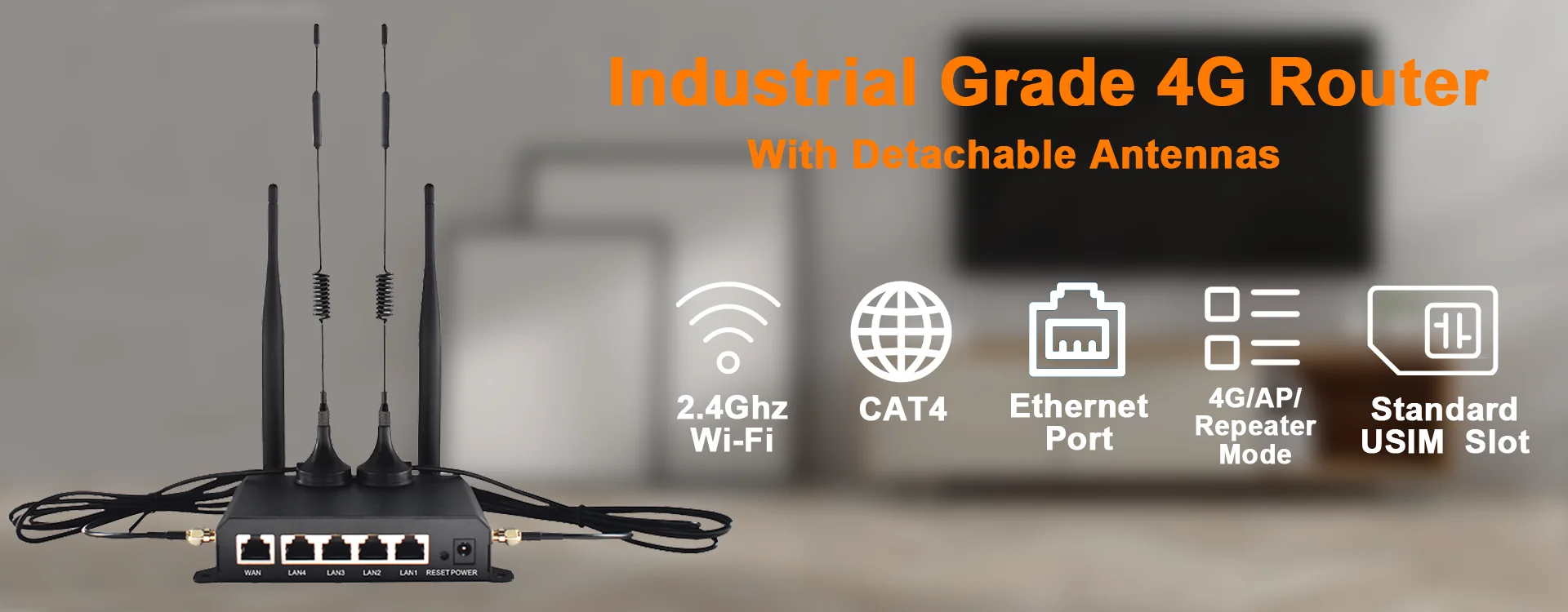
4pcs external antennas provide more stable and better signal transmission,include 4G LTE antennas and 2.4Ghz Wi-Fi antennas.
With 10/100 Ethernet Port
The Router with 1x 10/100 Mbps Ethernet port.To meet the needs of different users, Ethernet ports are provided, which can be used in a variety of scenarios.
Support 10 User/Devies Connect at the same time
The router supports up to 10 simultaneous users/devices, allowing your friends or family to connect to your router.Also smart devices in the home can connect to this router.
Plug and Play
When you insert the SIM card, you can instantly access the Internet anytime and anywhere. (Some SIM cards need to log in to the Web UI of the router and configure the APN information before they can access the Internet.)
Support for multiple devices
It can connect to mobile phones, televisions, cameras, computers, etc.Solve the problem that devices need network.
Specification:
CPU: ASR1803 Series +AIC8800DW
Flash: 64Mb
RAM : 256Mb
Wi-Fi Frequency: 2.4GHz
Wi-Fi Standards: IEEE802. 11 b/g/n/ax
Wi-Fi Access Rate: 2.4Ghz WiFi up to 300Mbps
CAT4 4G LTE Transmission Rate: Up 150 Mbps(DL)/Up 50Mbps(UL)
External Antenna : 2.4Ghz Wi-Fi Antenna and LTE Antenna(Non-detachable)
Nano SIM Card Slot: 1* 4FF SIM Card Slot
USB Port: Only for upgrade the 4G modem
LAN Port: 1x 10/100 Mbps
DC Power: DC 12V/1A
Working Temperature: -10°C to 45°C
Storage Temperature: -20°C to 60°C
Operating Humidity: 10%~90% (no condensation)
Package Listing:
1x CAT4 4G LTE Router
1x DC 12V Power Supply
1x Ethernet Cable
1x User Manual